
Algorithms:
So, what exactly is an algorithm?
Essentially, it’s a series of steps or instructions that need to be followed in a specific order to complete a task. For example, tying your shoes is a simple action that most of us perform daily, yet it can be broken down into an algorithm.
To tie your shoes using the “rabbit ear” method, start by putting on your shoes (with or without socks—your choice). There are various ways to tie shoelaces, but let’s stick with the basics. First, make a basic knot with the laces. Then, create a “bunny ear” loop with one lace and repeat with the other lace. Finally, tie a knot using the two “bunny ears.” And voilà! You’ve completed a step-by-step process—just like an algorithm.
And how this could be an algorithm?
As we said, an algorithm is simply a set of actions that need to be followed in a specific order to achieve a result. Let’s look at two ways to represent this process: a simple list and a flowchart. Here’s how the “bunny ear” method looks as a list of steps:
- Put on your shoes (with or without socks).
- Make a basic knot with the laces.
- Create a “bunny ear” loop with one lace.
- Repeat with the other lace.
- Tie the two “bunny ears” together with a basic knot.
And just like that, you’ve used a list of steps to tie your shoes! A flowchart version may look a bit more complex, but don’t worry—it’s just another way to visually map out these same steps.
In programming, we use lists, flowcharts, and other tools to create algorithms that computers can follow. Just like tying your shoes, each algorithm is simply a step-by-step path from start to finish.
Flowcharts
A flowchart is a visual tool that represents a process step by step, using shapes and arrows. Each shape has a specific meaning: rectangles typically represent actions or steps, diamonds indicate decisions, and arrows show the flow or sequence of steps. By arranging these shapes in a logical order, a flowchart shows how to move from one step to the next, helping to clarify complex processes.
Using our shoe-tying example, we could make a flowchart that starts with “Put on shoes” in a rectangle, followed by “Make basic knot.” Then, we’d add two steps to create “bunny ears” and end with the final knot to complete the process.
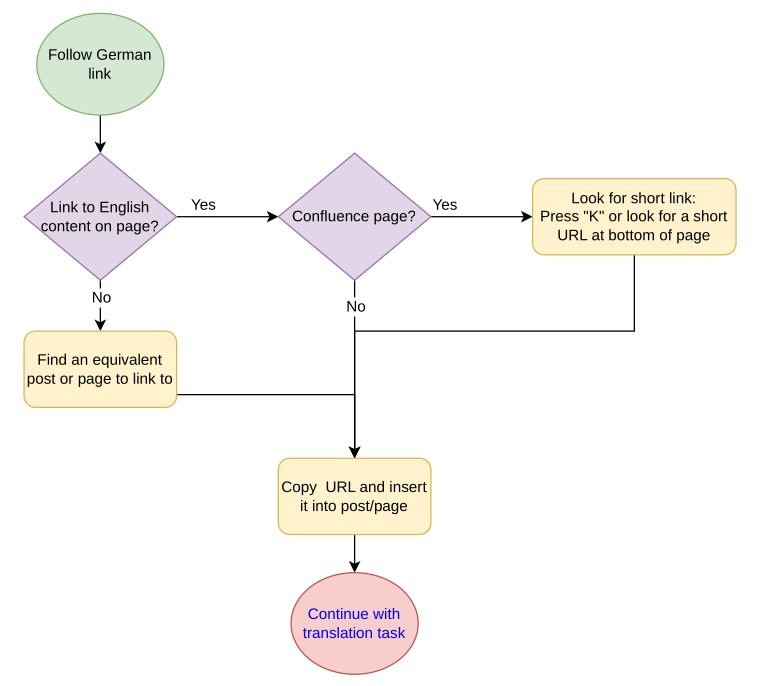
On this flowchart example:
1) We begin following a German link
2) Does the page has link to english content?
– If yes, the use the english link.
– If no, follow to the next step.
3) Check if it’s a Confluence page:
– If no, proceed to the next step.
– If yes, locate the short link (by pressing “K” or by checking the bottom of the page) and add it to the target post or page.
4) If there’s no link to English content and the page isn’t a Confluence page:
– The user should look for an equivalent post or page to link to.
5) Finalize:
– Copy the URL found and insert it into the translated post/page.
– Continue with the translation task.
In programming, we use lists, flowcharts, and other tools to create algorithms that computers can follow. Just like tying your shoes, each algorithm is simply a step-by-step path from start to finish, and flowcharts make it even easier to visualize that path in an organized, easy-to-follow way.
Happy coding! ☕